Sunday, 6 March 2011

Libraries needed for RoR development

For a RoR project that has a Gemfile, you can install all the required gems using the bundle command. You need to install bundler first. You may also install some other apps/libraries by using the following commands:
sudo apt-get install build-essential ruby1.8-dev
sudo apt-get install mysql-server mysql-client libmysqlclient-dev
sudo apt-get install sqlite3 libsqlite3-dev
sudo gem update --system 
sudo gem install bundler

Saturday, 5 March 2011

Clutter

We made Clutter, a Chrome extension that allows you to view multiple websites in the same tab. You can find it in Google's webstore:  http://bit.ly/eBIPZW

We attended the Chrome hackathon on February 19 at HubSpot's office in Cambridge. Jan Kleinert from Google gave us a tutorial on Chrome extension and then we began the hacking.

We decided what extension to make before the hackathon. Victor came up with the idea and it was inspired by the small hack he did during the IAP. During our Battlecode hacking, he made a split-pane display to show three websites (Pandora, google doc, and IRC chat) in the same tab as a dashboard and projected it. This is especially useful for the Chrome notebook because all it has is a browser window, and you cannot have multiple windows.

The one he made was a static layout, what we added, in addition to making it a Chrome extension, is allowing adding and removing panes at whatever position you want. We won the hackathon in the end and Jan wrote a blog post about this event as well.

Friday, 4 March 2011

Command to remove all .svn folders

find ./ -name ".svn" | xargs rm -Rf
Explanations:
xargs is used to build and execute command lines from standard input. It breaks list of arguments into sublists small enough to be acceptable.

Monday, 28 February 2011

User Study

I'm reading a CHI paper recently and noticed some techniques and terminologies in it that may be useful for my future user studies.

Counterbalancing
Definition: a within-subjects design involves changing the order in which treatment conditions are administered from one participant to anther so that the treatment conditions are matched with respect to time. The goal is to use very possible order of treatments with an equal number of individuals participating in each sequence. The purpose of counterbalancing is to eliminate the potential for confounding by disrupting any systematic relationship between the order of treatments and time-related factors [1].

Sources:
1. Gravetter. F., and Forzano L.. Research Methods for the Behavioral Science. 259.

Sunday, 27 February 2011

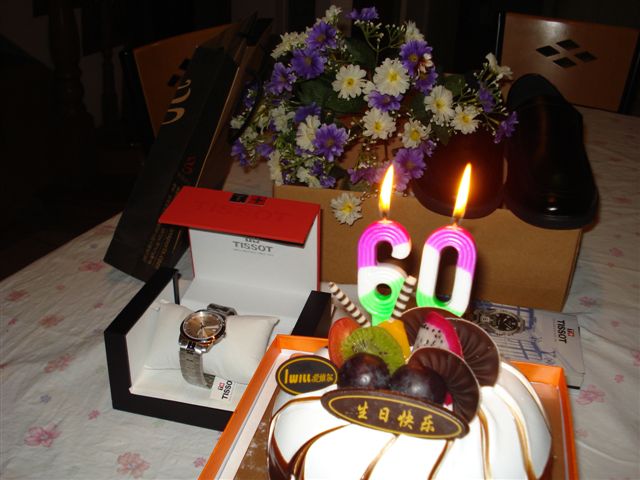
祝爸爸生日快乐!

今天(苏州是昨天)是爸爸60岁大寿,我做了可爱的兔子,马和猪(我们一家三口,muhaha)还有寿桃为爸爸祝寿。马比较难做,只能发挥想像了。用牙签做的4条腿是Victor的主意,因为马的腿比兔子和猪要长的多,所以可以突出这点来区分他们。还是比较成功的,站得也挺稳。马的头上还有鬃毛,是木耳。

这是做生日快乐字样的模板,这比做latte art简单多了,不需要手上的技巧,但是也挺好看的。:)

爸爸妈妈自己也小小庆祝了一下,天梭的表是我送给爸爸的生日礼物,去年十一月回去的时候带回去的。


Sunday, 20 February 2011

CSS Layout: Positioning

Yesterday, during the Google Chrome Hackathon, I was trying to replace the text on a button with an image, for example, replacing "Go" in the button below with an arrow image.


I can certainly add a background image for the button, but the text will still be seen above the background. Due to the lack of time, I just deleted the text in the html file. However, I feel that replacing the text with an image is really a styling choice rather than semantic.

Today, I started to read the book "Pro CSS and HTML Design Patterns" to improve my css skills. It actually mentions about the Text Replacement design pattern in the first chapter. It requires the use of css layout positioning to achieve the effect.

First, a recap on the positioning models:
  • Position an element by setting position to something other than static.
  • Use left, right, top and bottom to change the default position.
  • You can use position: static to "unposition" an element.
position 
In flow 
Positioning
static
yes
according to the flow
relative 
ghost
relative to the flow position 
absolute 
no
offset from its nearest positioned ancestor     
fixed
no
screen coordinate space

Text Replacement

Replace "Go" with this image:

Result:


Method: (Taken from p209 of the book.)
HTML
 TEXT 
CSS
#UNIQUE-ID { 
  position:relative; 
  padding:0; 
  overflow:hidden;
  width:IMAGE_WIDTH;
  height:IMAGE_HEIGHT; 
}
#UNIQUE-ID span { 
  position:absolute; 
  left:0; 
  top:0; 
  margin:0;
  width:IMAGE_WIDTH;
  height:IMAGE_HEIGHT;
  background-image:url("FILE.EXT");
  background-repeat:no-repeat; 
}

Initially, when I was testing with this, I found that the Chrome browser includes the border width in the height and width of the content size. By inspecting the element, I found that box-sizing is set to border-box. By setting it back to content-box, it behaves normally.

Thursday, 17 February 2011

DLP vs LCD Projectors

I'm using 4 DLP projectors (Dell 5100MP) for my tabletop display system and so far they are giving me a lot of troubles. First, it produces rainbow artifacts when the display is seen through a camera. Now, it produces significant flickering when projecting through an optical shutter. The LCD projector does not produce such artifacts. It seems like we should have gone for the LCD projectors at the very beginning. I think by understanding better how each of them works will allow us to make better decisions in the future and also for the current research.

LCD Projector
LCD (liquid crystal display) projectors contain three separate LCD glass panels, one each for the red, green, and blue components of the video signal. Each LCD panel contains thousands (or millions) of liquid crystals that can be aligned in either open, closed, or partially closed positions to allow light to pass through. The alignment is controlled by the electric field between the two transparent electrodes on the two sides of the liquid crystal molecules. The projector typically sends light through special dichroic filter / reflector assemblies called "dichroic mirror" that separates light to the three LCD panels. Wikipedia has a nice explanation and a diagram on how it works.

DLP Projector
DLP (Digital Light Processing) projectors use a DLP chip with reflective surface made up of millions of tiny mirrors. To define color, a color wheel is used which contains a red, green and blue filter. This wheel spins in the light path between the lamp and the DLP chip and alternates the color of the light hitting the chip. The mirrors tilt away form or into the lens path based upon how much each color is required for each pixel. In the most expensive DLP projectors, there are three separate DLP chips, one each for the red, green and blue channels. They are usually over $10,000 and do not use a color wheel.

Rainbow Artifacts and Flickering
The wheel based DLP projectors produce rainbow artifacts because of the sequential color updating from the wheel. As the color wheel spins, the image on the screen is either red, green or blue at any given instant in time. Since LCD projectors and 3-chip DLP projectors always deliver a constant red, green, and blue image simultaneously, they do not create rainbow artifacts.

Under a switching optical shutter, flickering occurs with the 1-chip DLP projector because the period of the rotating wheel does not match with the period of the optical shutter.

Source: http://www.projectorcentral.com/lcd_dlp_comparison.htm