Showing posts with label kinect. Show all posts

Friday, 19 October 2012

Kinect depth variance analysis


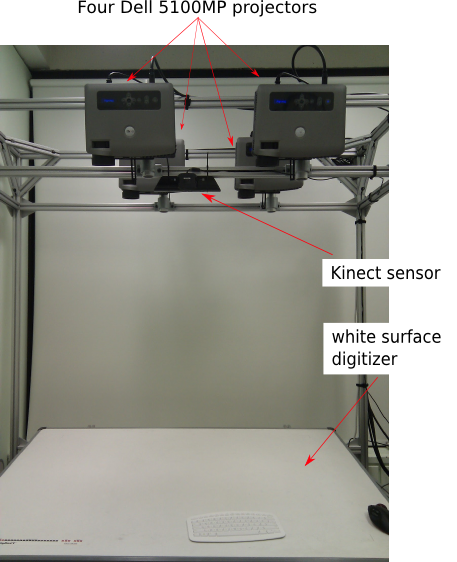
Here are the visualizations of absolute depth differences for each pixel for 40 frames using a Kinect. The setup is like this.

White color shows all pixels with absolute difference greater than 4mm

The high variance at the bottom right corner is due to the mouse which has a shiny surface and the Kinect does not work very well with shiny surfaces.  

White color shows all pixels with absolute difference greater than 2mm

White color shows all pixels with absolute difference greater than 1mm

Absolute depth variance shown as a heat map. The color changes from black, red, yellow and white as the value increases. The difference values are clipped between 0.8 and 2.

Tuesday, 17 April 2012

Getting Started with Kinect for Windows SDK

I have been experimenting with Kinect for Windows SDK and here are the steps to get things started.

1. Download and install the Kinect for Windows SDK. Follow the system requirements and installation instructions on the website. The main software requirements are Visual Studio 2010 Express or other Visual Studio 2010 edition and .NET Framework 4.0.

2. To get started with the development, I find the Quickstart Series are very helpful.

3. Some other details about the API:
  • In the depth map, each pixel is labeled with a number from 1 to 7 to indicate that it is part of user 1, 2, and so on up to 7. If a pixel is not part of a user then it is assigned index of zero. Each pixel is a short value. We can extract the player index and the depth using the following:
    userIndex = s & DepthImageFrame.PlayerIndexBitmask; // The mask is 0x07.
    depth = ((ushort) s) >> DepthImageFrame.PlayerIndexBitmaskWidth; // The width is 3.
    
  • Depth values are in mm.
  • There are 20 joints in the skeleton tracking.

Tuesday, 20 December 2011

Kinect statistics

Depth full resolution: 640 x 480 pixels
Device max depth: 10,000
Depth sensitivity: 11-bit, 2,048 levels
The depth sensor has a range limit of about 0.5m - 5m with a resolution of 1.5mm at 0.5m and 5cm at 5m.

Wednesday, 26 October 2011

Using Kinect with OpenNI on Ubuntu 11.10

I recently upgraded to Ubuntu 11.10 and then my Kinect stopped working. I'm using OpenNI library for getting data from the Kinect.

At the beginning, when I ran the sample program NiViewer from the OpenNI libaray, I got the following error:

Open failed: failed to set USB interface.

I found the solution on OpenNI Google group discussion. You need to remove the gspca_kinect kernel module that comes with the upgrade by doing:
rmmod gspca_kinect
It seems to work even though it says "cann't find the module gspca_kinect". However, every time you restart the computer or replugin the Kinect USB, the module will be loaded again. To permanently remove the module, you can change the name of the module file:
sudo mv /lib/modules/3.0.0-12-generic/kernel/drivers/media/video/gspca/
gspca_kinect.ko /lib/modules/3.0.0-12-generic/kernel/drivers/media/video/gspca/gspca_kinect.ko.BAK

A better way may be blacklisting the module as suggested by this post. In this way, even after a kernel upgrade, the module will not be loaded.
$sudo gedit /etc/modprobe.d/blacklist.conf
Then add the following line to the end of the file and reboot:
blacklist gspcs_kinect

After this, the program could run, but I only got the RGB image data and the depth image was blank. Someone find out that this is due to the wrong use of memcpy in the OpenNI library. The line of code that causes the problem is in "/Source/OpenNI/Linux-x86/XnUSBLinux-x86.cpp" function "XN_THREAD_PROC xnUSBReadThreadMain(XN_THREAD_PARAM pThreadParam)" around line 1057. Instead of using memcpy, it should be:
memmove(pTransfer->buffer + nTotalBytes, pBuffer, pPacket->actual_length);
The difference between memcpy and memmove is that with memcpy, the destination cannot overlap the source at all, while with memmove, it can. For example, memcpy might always copy addresses from low to high. If the destination overlaps after the source, this means some addresses will be overwritten before copied. memmove would detect this and copy in the other direction - from high to low - in this case. However, checking this and switching to another (possibly less efficient) algorithm takes time.

The previous version of memcpy in libc6 may not make the difference so distinct, but in the new updated version of libc6 version 2.13, it might copy memory backward in some conditions, which causes issues if the source and destination overlap. You can read more about the changes in the new version in "/usr/share/doc/libc6/NEWS.Debian.gz".

Tuesday, 20 September 2011

NiViewer


Today I ran NiViewer provided by OpenNI again on Captured_08_22_11.oni, and observed vertical lines on the depth image. The vertical lines also shift with time.

The default coloring of the depth image is according to linear histogram. MAX_DEPTH is set to be 10000. The histogram is calculated according the following steps (in Draw.cpp, line 549, calculateHistogram()):
  - Count the number of pixels with the same depth_value and store it in depthHist[depth_value].
  - Calculate the accumulative frequency.
  - Invert the accumulative frequency.

In this way, pixels with greater depth values will have darker color. The use of histogram is good because the color is not scaled linearly with depth but with the frequency of the occurrences of the depth values.

Friday, 24 June 2011

Working with PrimeSense's Nite Middleware

Today when I tried to run the sample program in the Nite package, I got an error saying "One or more of the following nodes could not be enumerated:" It worked before, so I wondered why. Eventually I solved the problem by reinstalling the Nite package.

1) Go to the downloaded Nite package directory.
2) Use the following commands to reinstall:
$ sudo ./uninstall.sh
$ sudo ./install.sh
When prompted, enter the licence key: 0KOIk2JeIBYClPWVnMoRKn5cdY4=